Documentation / Advanced Configurations
CLI Minimum fail
CLI Minimum Fail Severity
Set a severity threshold so the Prancer CLI exits non-zero — and your CI/CD pipeline fails — when the pentest produces alerts at or above that level. This lets you block deployments on critical issues while letting low findings through to a backlog.
Before you start
- The Prancer CLI configured in your pipeline. See PAC CLI in CI/CD.
- Either:
- shell access to your on-prem deployment for the global default, or
- access to the Prancer infra dashboard for a per-collection override.
Note: Allowed values, low → high:low,medium,high,critical. The pipeline fails when at least one alert matches the threshold or higher.
Option A — Global default in config.json
Edit /mnt/azure/customers/<YOURCUSTOMERID>/prancer-pac/Conf/config.json and add pac_alert_min_severity inside the deploy section, then restart the services.
{
  "deploy": {
    "listenerPort": "5050",
    "customerId": "CUSTOMERID",
    "main_url": "http://localhost:5060",
    "cli_versions_path": "cli-versions.json",
    "enviroment": "prod",
    "cli_cache_dir": "./cache-cli",
    "default_addones": true,
    "consumer_uri": "http://localhost:3000",
    "pac_alert_min_severity": "medium"
  }
}
Option B — Per-connector override in the dashboard
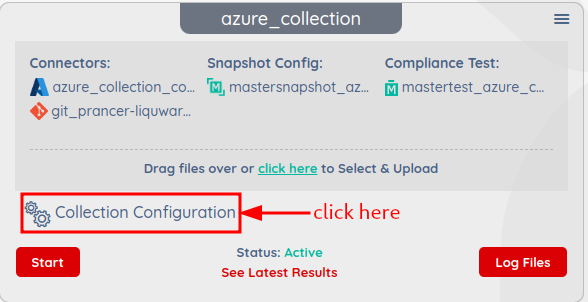
1. Open the infra dashboard and select the connector. !Choose connector 2. Under the configuration section add pac_alert_min_severity and set the value. !Minimum severity configuration 3. Click Keep changes.
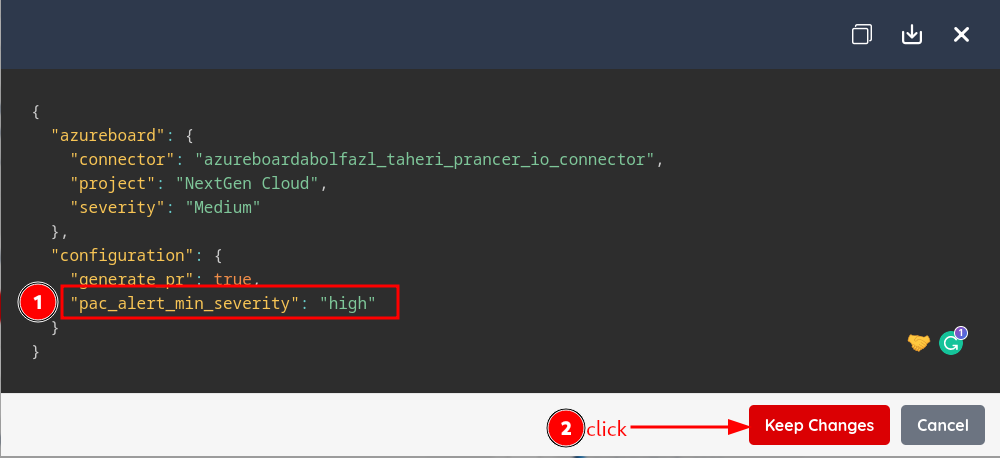
Tip: The connector value wins. If a collection doesn't definepac_alert_min_severity, Prancer falls back to the value inconfig.json.
Next steps
- PAC CLI in CI/CD — wire the threshold into your pipeline.
- Upload findings via CLI — push external findings into Pensuite AI.
- PAC Findings — review what triggered the failure.