Documentation / Advanced Configurations
Script Parameters
PAC Custom Scripts — Parameters & Secrets
Custom attack scripts (Python or JavaScript) often need configurable values: target URLs, form fields, headers, or sensitive credentials. Hard-coding them locks the script to one app. PAC instead lets you mark every dynamic value as a placeholder and supply real values at runtime through metadata, the PAC config, or the secure Vault.
Before you start
- A custom attack script in your Git repo (see Custom Add-ons).
- Access to Vault in the Prancer portal for any secret values.
How resolution works
| Source | Used for | Priority |
| --- | --- | --- |
| metadata.yaml next to the script | Default values shipped with the script | Lowest |
| Parameters / Secrets in the PAC config | Per-application overrides | Higher |
| Vault entries (referenced from Secrets) | Sensitive values | Always wins for secret keys |
If both Parameters and Secrets define the same key, secrets win. If any placeholder is left unresolved, PAC refuses to load the script — the run fails fast instead of producing bad results.
Warning: Never put real credentials inParametersor in a metadata file committed to Git. UseSecrets+ Vault for anything sensitive.
1. Mark placeholders in the script
Use {{key}} syntax anywhere in the script body.
import org.parosproxy.paros.network.HttpRequestHeader as HttpRequestHeader
import org.parosproxy.paros.network.HttpHeader as HttpHeader
import org.parosproxy.paros.network.HttpMessage as HttpMessage

ROOT_URL       = "{{url}}"
USER1_USERNAME = "[email protected]"
USER2_USERNAME = "[email protected]"
USER1_PASSWORD = "{{user1password}}"
USER2_PASSWORD = "{{user2password}}"
LOGIN_URL      = "{{url}}rest/user/login"
BASKET_URL     = "{{url}}rest/basket/6"
2. Provide defaults in metadata.yaml
Sits next to the script in Git.
Name: Privilege Escalation
Type: active
Engine: jython
Description: An attacker gains access to privileges they are not entitled to.
Charset: UTF-8
Parameters:
  url: http://prancersampleapp01.eastus2.cloudapp.azure.com:8008/
Secrets:
  user1password: user1-password-key
  user2password: user2-password-key
3. Override per application in the PAC config
Target: http://demo.testfire.net/
WebScan:
  AjaxSpider: false
CVE:
  - Path:
      Include: [webserverfingerprinting]
      Exclude: []
    Connector: xylo_github_connector
    Parameters:
      url: http://prancersampleapp01.eastus2.cloudapp.azure.com:8008/
    Secrets:
      user1password: user1-password-key
      user2password: user2-password-key
4. Store secret values in the Vault
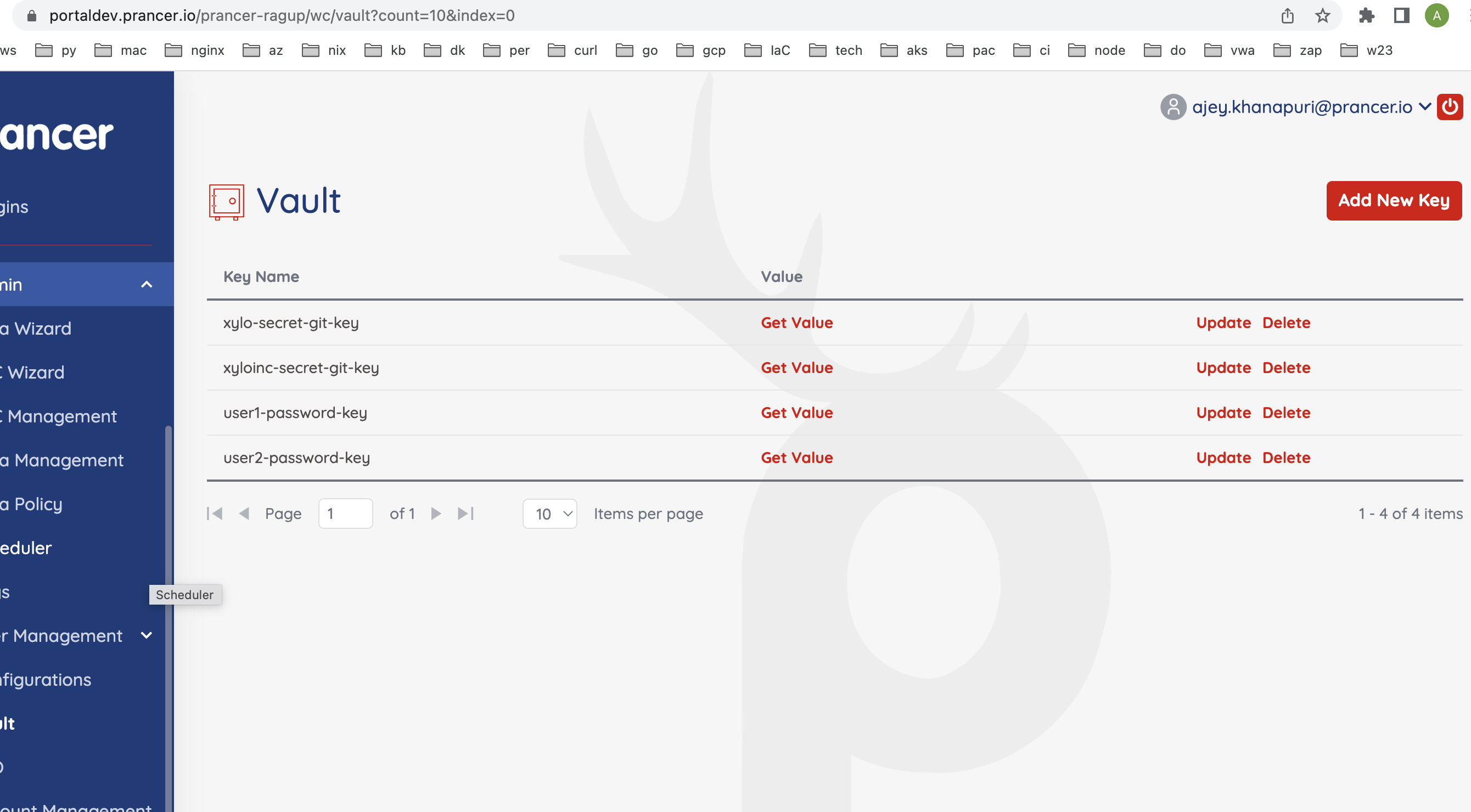
In the Prancer portal, create one Vault entry per secret key. The Key Name must match the value on the right-hand side of Secrets: (e.g. user1-password-key).
!Vault entries for script secrets
Tip: Use distinct vault keys per environment (user1-password-key-dev,…-prod) and pick the right one in the PAC config of each app.
Next steps
- Custom Add-ons & CVE Management — load the scripts.
- Vault — manage secret entries.
- Custom Nuclei Templates — same parameter system for Nuclei attacks.