Documentation / Authentication
Cookie Auth
Cookie Authentication
Use cookie-based auth when your application sets a session cookie at login and expects it on every subsequent request — the most common pattern for traditional server-rendered web apps.
Tip: if your app uses a Bearer token instead of a cookie, use JWT or OAuth. For static tokens that you need to inject directly, use Custom.
Before you start
You'll need:
- The login URL and the format of the login request body.
- The logout URL *(so the scanner doesn't accidentally log itself out).*
- The session cookie name (e.g.
sessionID,connect.sid). - Username and password stored in your Key Vault *(Azure)* or Secret Manager *(AWS / GCP)*.
- A regex (or string) that only appears in logged-in responses — used as the login indicator.
Walk through the PAC Wizard up to the authentication step before continuing.
Step 1 — Open the auth page
In the wizard, you'll land here once the previous steps are complete.
!Auth screen with method picker
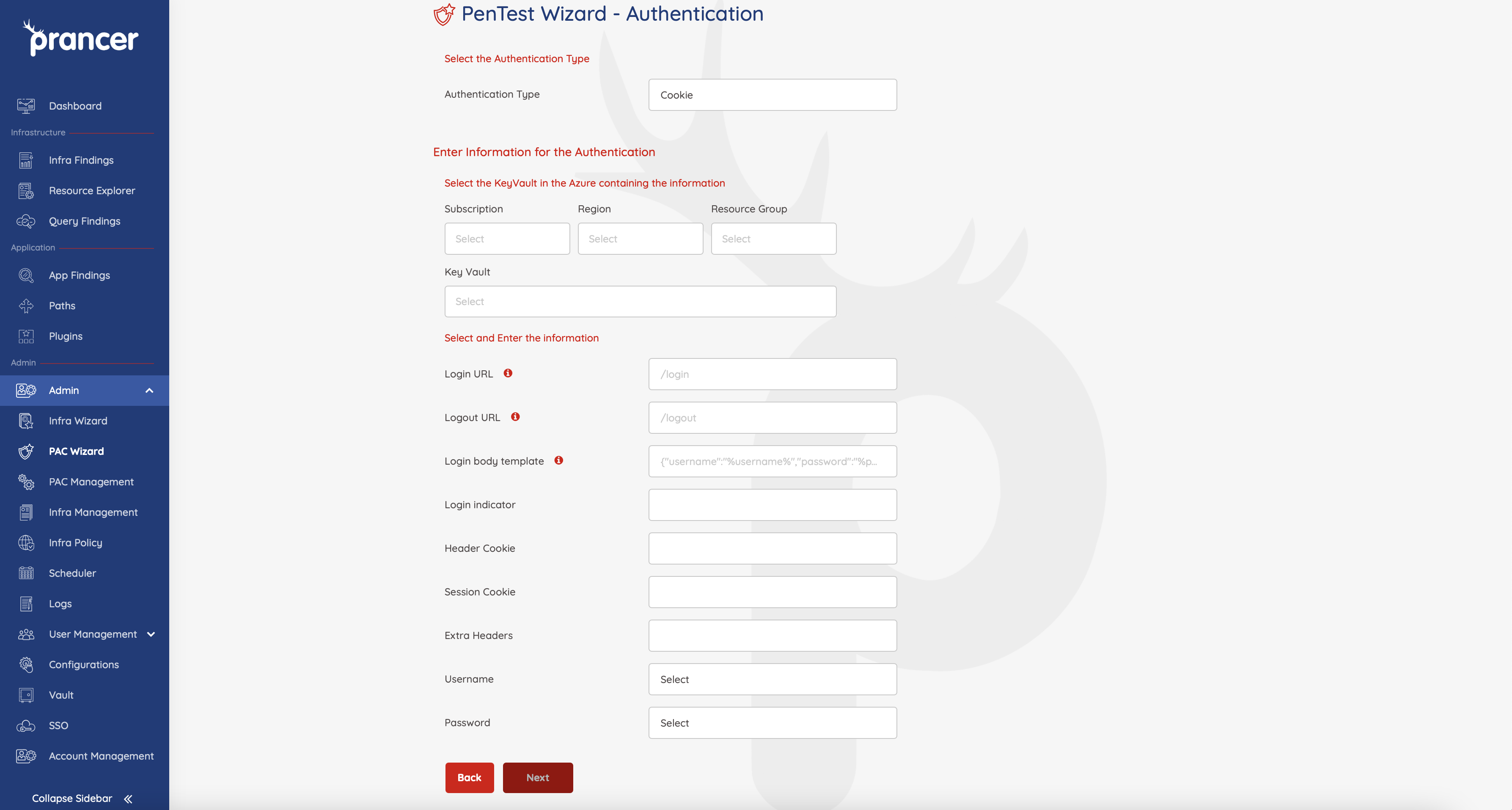
Pick Cookie as the authentication type, then point Prancer at the Key Vault / Secret Manager that holds your credentials.
Step 2 — Fill in the cookie auth fields
| Field | Sample | Notes |
| ------- | -------- | ------- |
| Key Vault | Any vault the connector can reach | Holds the username / password secrets. |
| Login URL | https://sample.com/login | Full URL the scanner POSTs credentials to. |
| Logout URL | https://sample.com/logout | Excluded from scanning so the session stays alive. |
| Login Body Template | {"username":"%username%","password":"%password%"} | Format of the login request. %username% / %password% are replaced from the vault. |
| Username | Vault key name | Pick from Key Vault dropdown. |
| Password | Vault key name | Pick from Key Vault dropdown. |
| LoginIndicator | Regex like \Q<a href="/user/logout">Logout</a>\E | Must only appear in logged-in responses. |
| Header Cookie | Cookie | Header name where the session is sent. |
| Session Cookie | sessionID | Cookie key name. |
| Extra headers | lang=en;tenant=acme | Any extra session headers. |
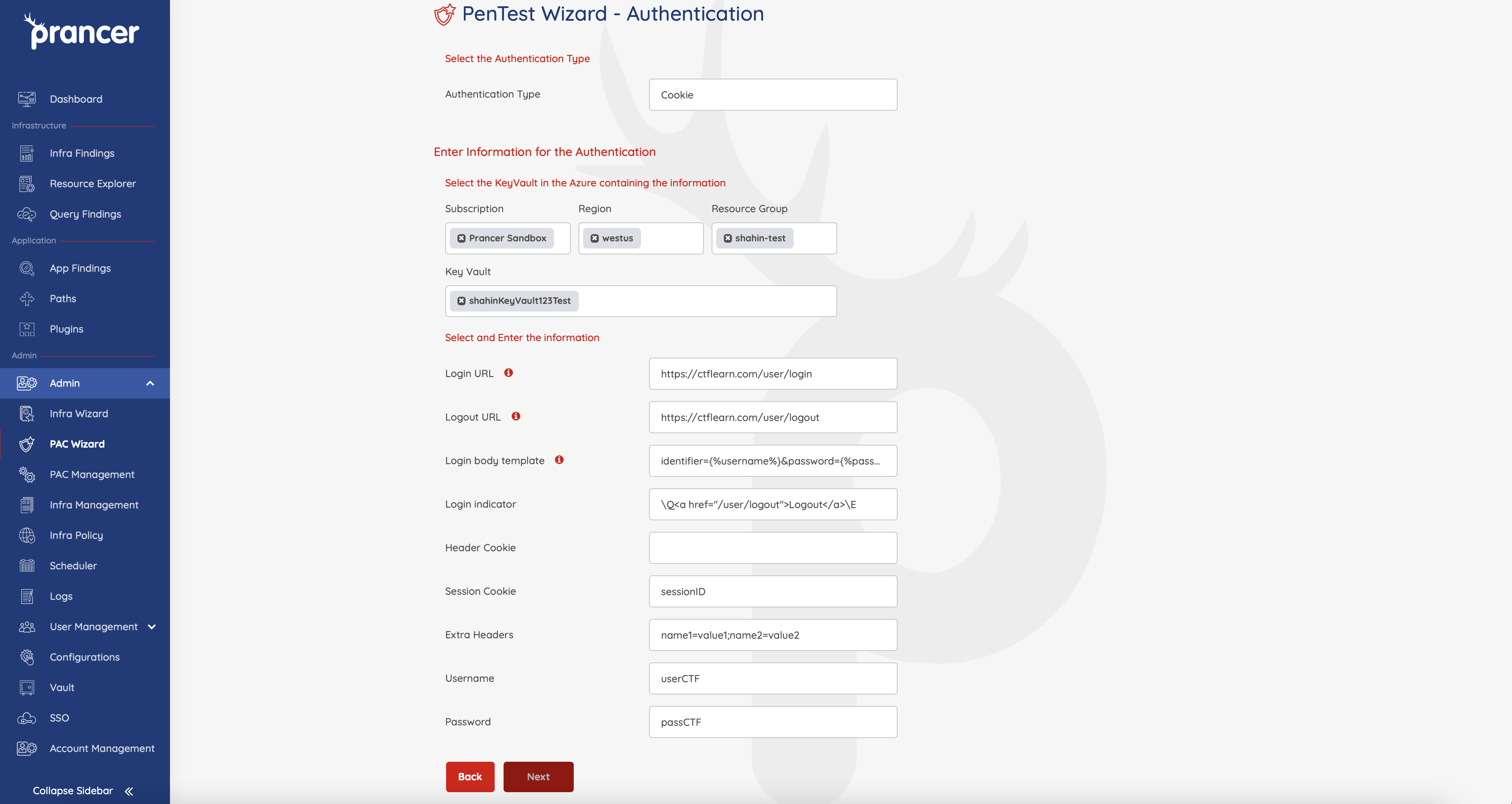
Warning: the LoginIndicator is critical. Pick a string that only appears when the user is logged in — otherwise the scanner won't know auth succeeded and will skip authenticated paths.
Generated PAC YAML
Collection: scenario_azure_cspm
ConnectionName: scenario_azure_cspm_connector
CloudType: azure
ApplicatioName: Ctflean cookie Azure
RiskLevel: standard
Compliance: [CIS]
ApplicationType: WebScan
Schedule: onetime
Target: https://ctflearn.com
Scanner:
  Cloud:
    Platform:
      Azure:
        ContainerInstance:
          AfterRun: delete
          NewContainerInstance:
            External:
              SubscriptionId: a6941677-4c37-42fb-960c-dad8f25060a3
              ResourceGp: shahin-test
              Region: westus
              ContainerGroupName: prancer-scanner-group
              ContainerName: prancer-pentest-instance
              ResourceName: prancer-instances
AuthenticationMethod: cookieAuthentication
Authentication:
  Vault:
    Azure:
      KeyVaultName: shahinKeyVault123Test
      SubscriptionID: a6941677-4c37-42fb-960c-dad8f25060a3
      Region: westus
      ResourceGp: shahin-test
  cookieAuth:
    UsernameSecretKey: userCTF
    PasswordSecretKey: passCTF
    LoginUrl: /user/login
    LogoutUrl: /user/logout
    LoginBodyTemplate: identifier={%username%}&password={%password%}
    LoginIndicator: \Q<a href="/user/logout">Logout</a>\E
    cookieHeadername: Cookie
    cookieSessionName: sessionID
    extraFields: name1=value1;name2=value2
Next steps
- Other auth methods: JWT · OAuth · Form-based · Custom.
- Reference: PAC file authentication blocks.