Documentation / Authentication
Custom Auth
Custom Authentication
Use Custom auth when your app uses a static token (you already have it) or has a login flow too complex to automate. You inject the token directly into headers, cookies, or both — Prancer never tries to log in.
Tip: OAuth callback flows (e.g. interactive consent) can't be automated by Prancer. Log in manually, grab the resulting tokens, and feed them in here as Custom auth.
Before you start
You'll need:
- The token value stored in your Key Vault *(Azure)* or Secret Manager *(AWS / GCP)*.
- Knowledge of how the app expects the token: as a header, a cookie, or both.
- The logout URL *(so the scanner doesn't invalidate the token).*
Walk through the PAC Wizard up to the authentication step before continuing.
Step 1 — Open the auth page
!Auth screen with method picker
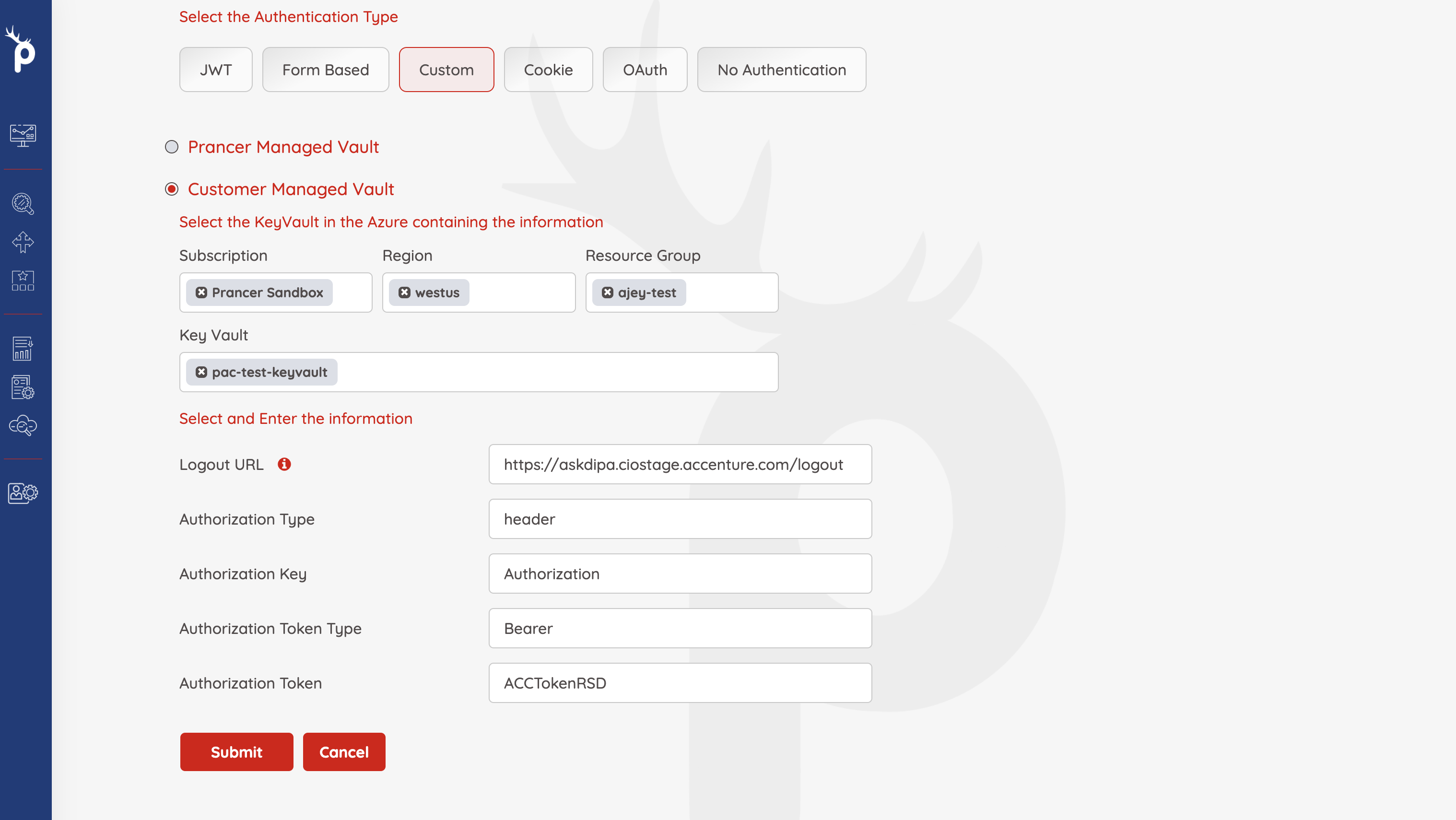
Pick Custom as the authentication type, then point Prancer at the Key Vault / Secret Manager that holds your token.
Step 2 — Fill in the custom auth fields
| Field | Sample | Notes |
| ------- | -------- | ------- |
| Logout URL | https://juiceshop.com/logout | Excluded from scanning. |
| Authorization Type | header, cookie, or both | Where the token goes. |
| AuthorizationKey | Authorization | Header name when using header auth. |
| AuthorizationTokenType | Bearer | Prefix before the token; can be empty. |
| AuthorizationToken | Vault key | Secret holding the token value. |
| Cookie Key | Cookie | Header name for cookie auth. |
| Cookie Value | Cookie payload | The cookie content. |
| Session Name | Session | *(Optional)* extra session field. |
| Session Value | Session value | Value paired with Session Name. |
| Extra Fields | KEY1=VALUE1;KEY2:VALUE2 | Appended to the cookie. |
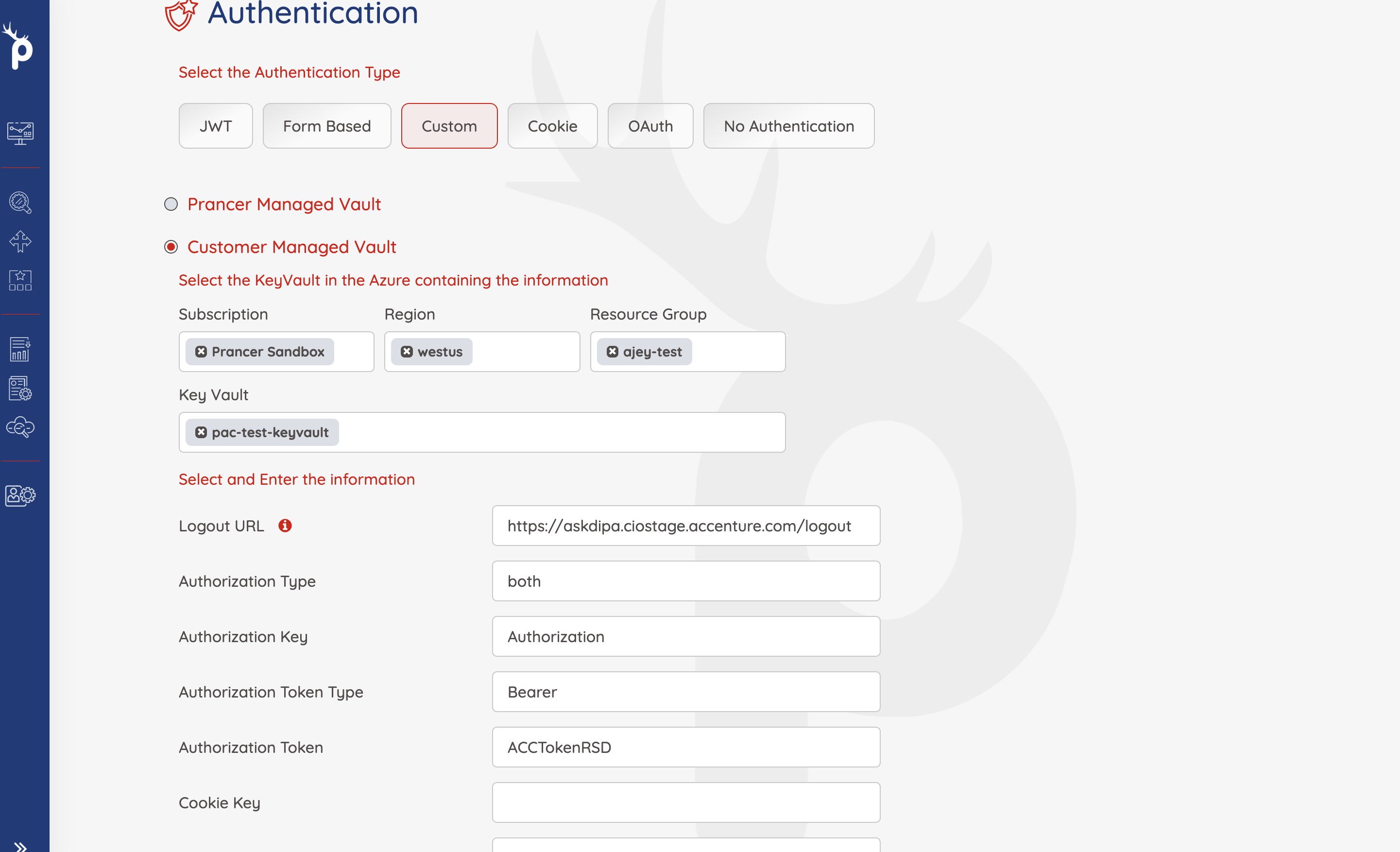
Warning: static tokens expire. Make sure your token is valid for the entire scan duration — a long pentest can outlast a short-lived token.
Generated PAC YAML
Collection: test_azure_pac_auto2
ConnectionName: test_azure_pac_auto2_connector
CloudType: azure
ApplicatioName: test_juice
RiskLevel: safe
Compliance: [CIS]
ApplicationType: WebScan
Schedule: onetime
Target: http://prancersampleapp01.eastus2.cloudapp.azure.com:8008
Scanner:
  Cloud:
    Platform:
      Azure:
        ContainerInstance:
          AfterRun: delete
          NewContainerInstance:
            External:
              SubscriptionId: a6941677-****-****-****-*****
              ResourceGp: shahin-test
              Region: westus
              ContainerGroupName: prancer-scanner-group
              ContainerName: prancer-pentest-instance
              ResourceName: prancer-instances
AuthenticationMethod: customAuthentication
Authentication:
  CustomAuth:
    AuthorizationType: header
    AuthorizationKey: Authorization
    AuthorizationTokenType: Bearer
    AuthorizationTokenValue: ACCTokenRSD
    CookieKey: ""
    CookieValue: ""
    SessionName: ""
    SessionValue: ""
    ExtraFields: ""
    LogoutUrl: https://juiceshop.com/logout
  Vault:
    Azure:
      KeyVaultName: sampleKeyVault
      SubscriptionID: a6941677-****-****-****-*****
      Region: westus
      ResourceGp: sample-test
Next steps
- Other auth methods: Cookie · JWT · OAuth · Form-based.
- Reference: PAC file authentication blocks.